
Memberships and direct debit · Only in Club
03 Members & retention
Memberships and direct debit for gyms
Every member and every subscription is in one file, with online sign-up and freezing. Monthly fees are collected automatically through your payment provider.
Club €599 per month per location · 14 days free · cancel monthly
At a glance
- What it is
- Members and subscriptions in one file, with online sign-up, freezing and automatic direct debit through your payment provider
- For whom
- Gyms, boutique studios, personal trainers and multi-location clubs
- Included in
- Club only (Grow + €200)
- Price
- €599 per month per location, 14 days free, cancel monthly
- Languages
- Your club's own language — ask for a custom language; Dialanta is translated with one click.
- Countries
- Worldwide
What it does
Three things this does for your club
Every member in one file
One file for all members and all subscriptions, with online sign-up and pre-filled sign-up links.
Direct debit through your payment provider
Monthly fees are collected automatically.
Failed payments become tasks
When a payment fails, it lands in Tasks for your team.
01 — The problem
Members and payments in different places.
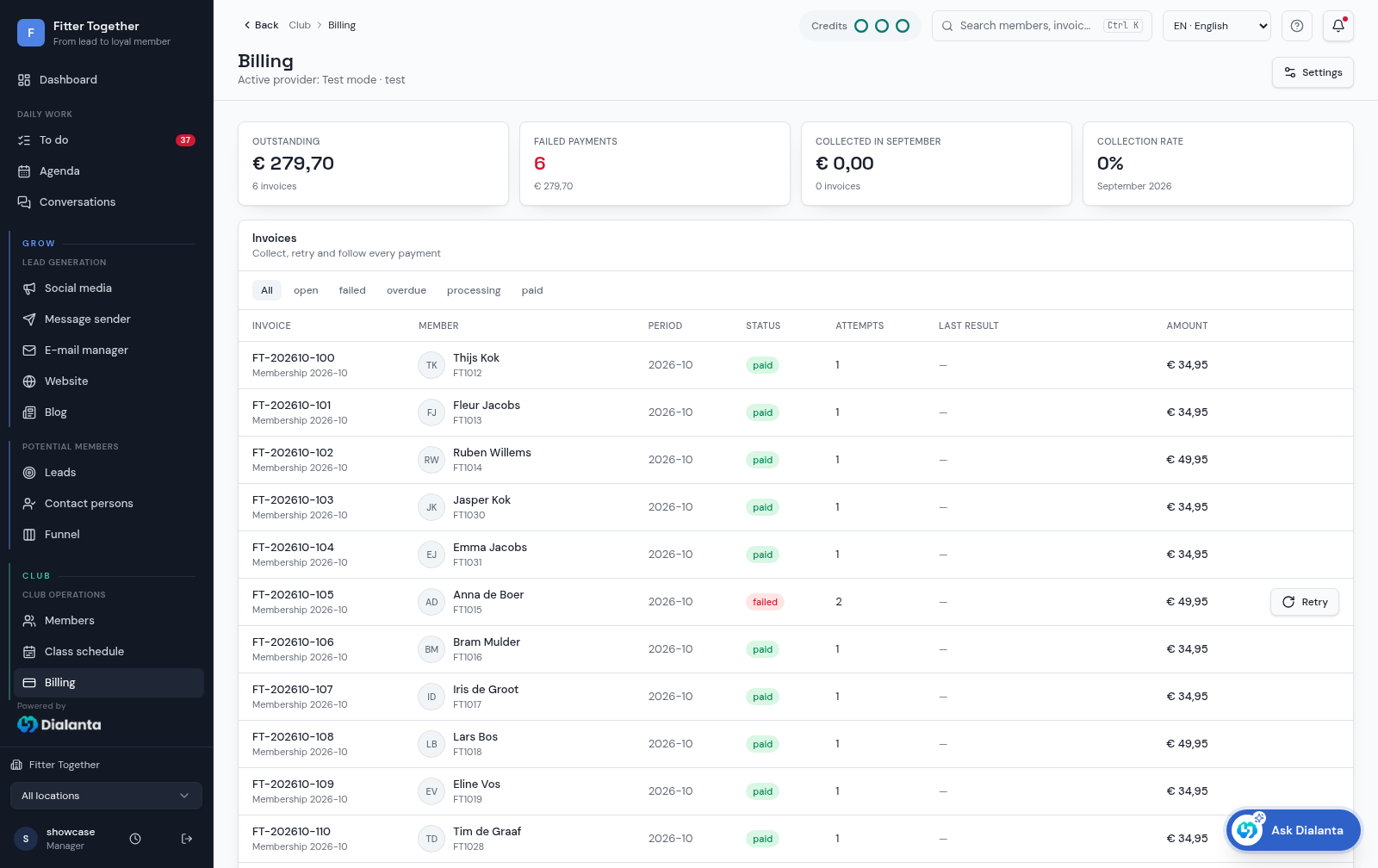
Members in one list, subscriptions in another, payments in a third. Chasing a failed payment takes hours, and freezing a membership means a phone call.
Dialanta is the all-in-one AI software for fitness businesses. Club puts members, subscriptions and direct debit on the same person card.
A lead becomes a member without changing system, so the history from the first contact stays with the member.
This is part of Club, the package for everything after sign-up in Dialanta, the all-in-one AI software for fitness businesses.
02 — How it works
From sign-up to monthly fee in five steps
- 1A person signs upMembers sign up online, and you can send a pre-filled sign-up link.
- 2One file per memberEvery member and every subscription is in one file.
- 3Fees are collected automaticallyCollect monthly fees automatically through your payment provider.
- 4Failed payments land in TasksWhen a payment fails, it becomes a task for your team.
- 5Freezing is quickAny staff member can freeze a membership. Member requests go to reception.
03 — What is in it
From sign-up to monthly fee
Every member and subscription in one file
One file for all members and all subscriptions.
Online sign-up
Members sign up online.
Pre-filled sign-up links
Send a sign-up link that is already pre-filled.
Freezing
Any staff member can freeze a membership. Member requests go to reception.
Direct debit through your payment provider
Collect monthly fees automatically through your payment provider.
Class and visit cards
Sell cards with a set number of entries. Details below.
Family memberships and corporate fitness
Family groups with one payer, and company groups with an employer share. Details below.
Failed payments land in Tasks
When a payment fails, it becomes a task for your team.
04 — Class and visit cards
Class and visit cards
Sell a card with a set number of entries next to your subscriptions (in Dutch: strippenkaarten or rittenkaarten). Members use it for visits, classes or both.
Set up the card
- Create the card in Memberships, next to your subscriptions.
- Set the number of entries.
- Set how long the card is valid.
- Choose whether it counts for visits, classes or both.
Sell it
- Sell the card to a selected member, for example at the front desk with point of sale.
- Day passes are sold the same way.
How entries are used
- An entry is deducted on a qualifying check-in or class booking.
- Your cancellation rules decide whether an entry is returned.
Where staff see it
- Remaining and used entries show on the person card.
Cards sit next to your subscriptions. They do not replace recurring subscriptions and direct debit.
05 — Family memberships
Family memberships
Link the people in one household and let one of them pay.
Set up the group
- Create a family group.
- Link the members' records to the group.
- Choose the paying member.
Who pays
- The fees of the linked members are routed to the paying member.
Who keeps what
- Each person keeps their own member record.
Family groups are managed by your staff. There is no household self-service portal.
06 — Corporate fitness
Corporate fitness
Offer memberships through an employer, with the employer paying a share.
Set up the company
- Create a company group.
- Set the employer contribution as a percentage.
Who pays what
- The employer pays its percentage.
- The member pays the individual share.
Statement
- A monthly statement shows the employer's part.
The employer's part is not collected by direct debit, there are no HR or payroll connections, and Dialanta gives no tax or fiscal advice.
Company sign-up link
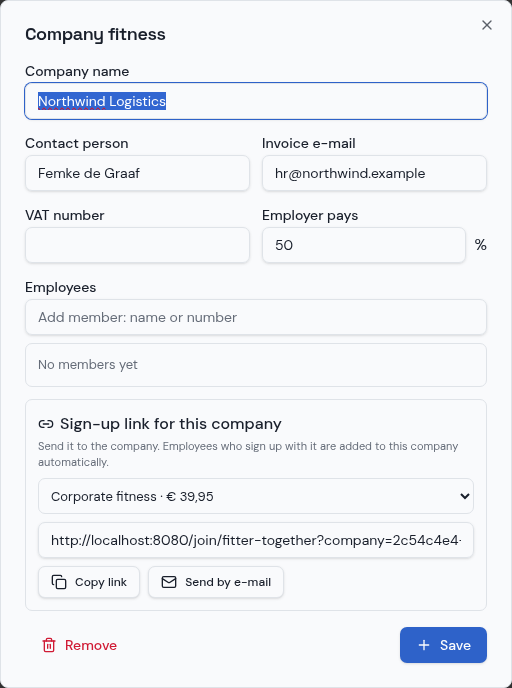
- For each company you pick a membership and get a sign-up link, to copy or to e-mail to the company.
- Employees who sign up with the link are added to that company automatically.
- The employer share is applied.
07 — Member brings member
Member brings member
Members invite friends from the club-branded member app. The new member's discount is deducted automatically at online sign-up, and once the friend is approved the inviting member's reward becomes a task for reception. Both person cards show who brought whom.
You choose
- Switch it on or off for your club.
- Reward the inviting member, the new member, or only one of the two.
The rewards
- Inviting member, for example: one month free, credit at the desk, a discount on the next invoice or your own reward.
- New member, for example: no joining fee, first month free, a euro or percentage discount or your own reward.
Members get an Invite a friend tile in the member app, with a personal link to share via WhatsApp. It is only in Club and uses no AI credits.
08 — Discount codes and promotions
Discount codes and promotions
Built into the membership plan builder. Members enter the code at online sign-up and it is checked instantly.
The code
- Codes such as AUTUMN2026 with a percentage or euro discount, no joining fee or first month free.
- A start and end date, a maximum number of uses and the memberships the code is valid for.
How it applies
- Discounts never stack: the best one applies.
- You see the usage count per code.
Discount codes are only in Club and use no AI credits.
What the screens show
The screens behind this page
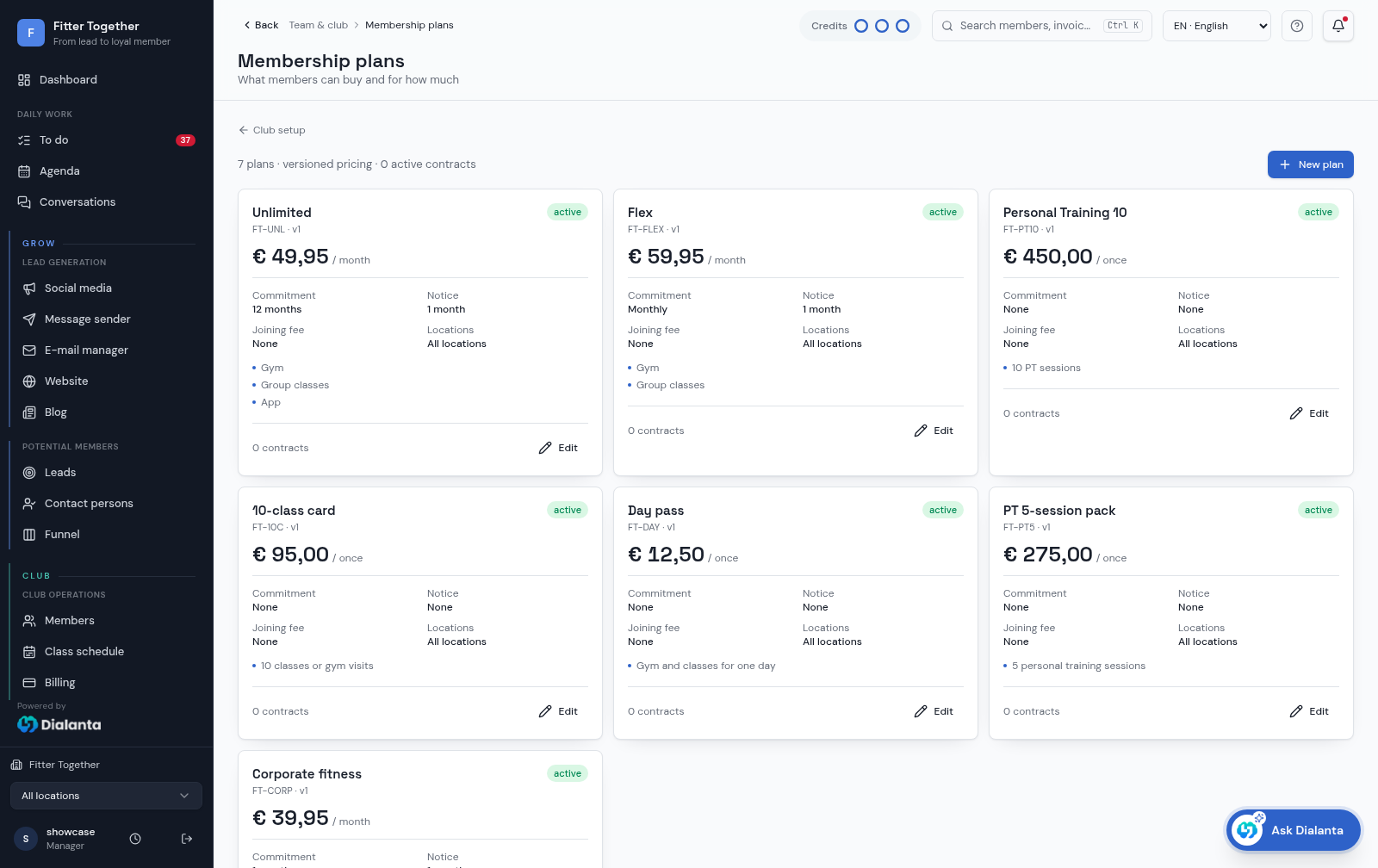
The billing screen shows invoices and their payment status in one place, so a failed payment is easy to find. The memberships screen shows the membership types and their settings that every member and subscription is based on.
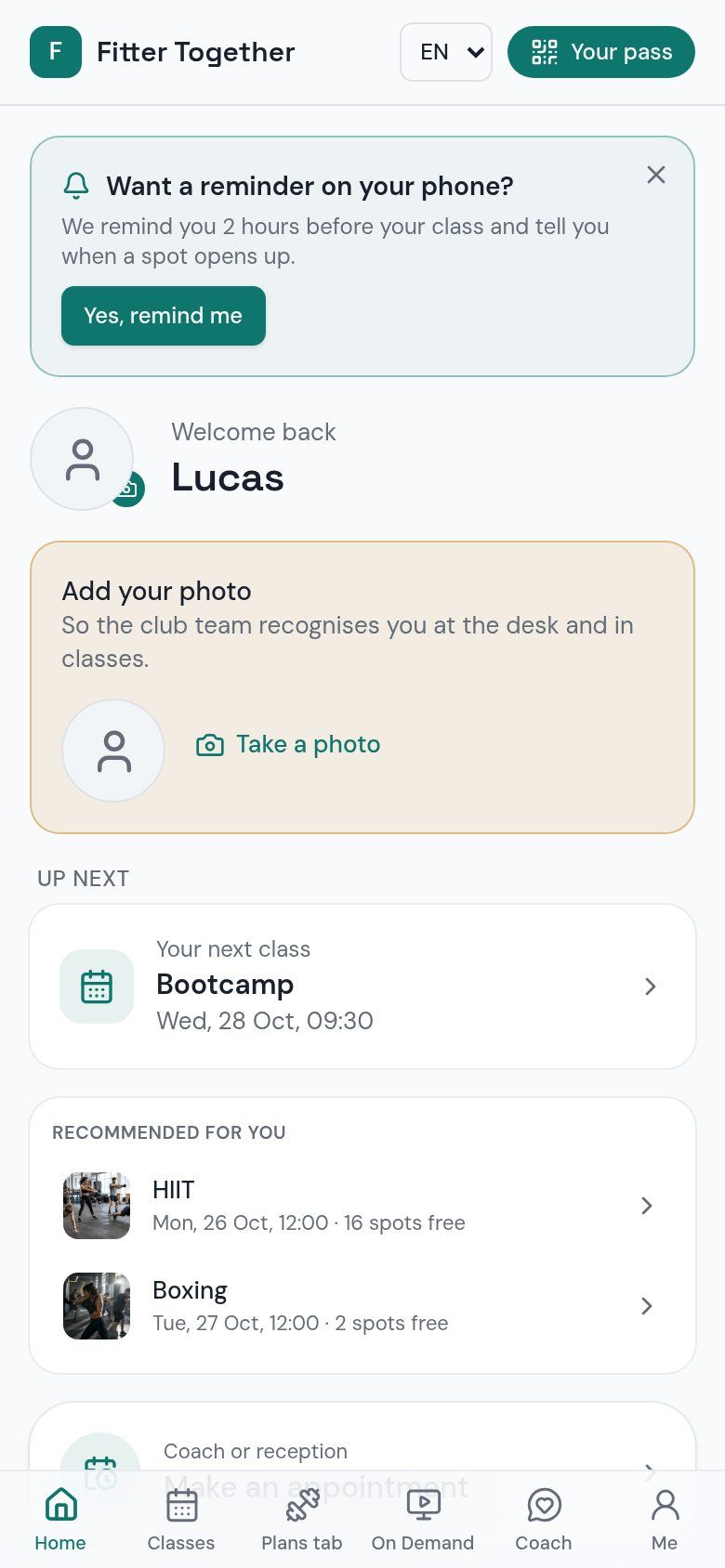
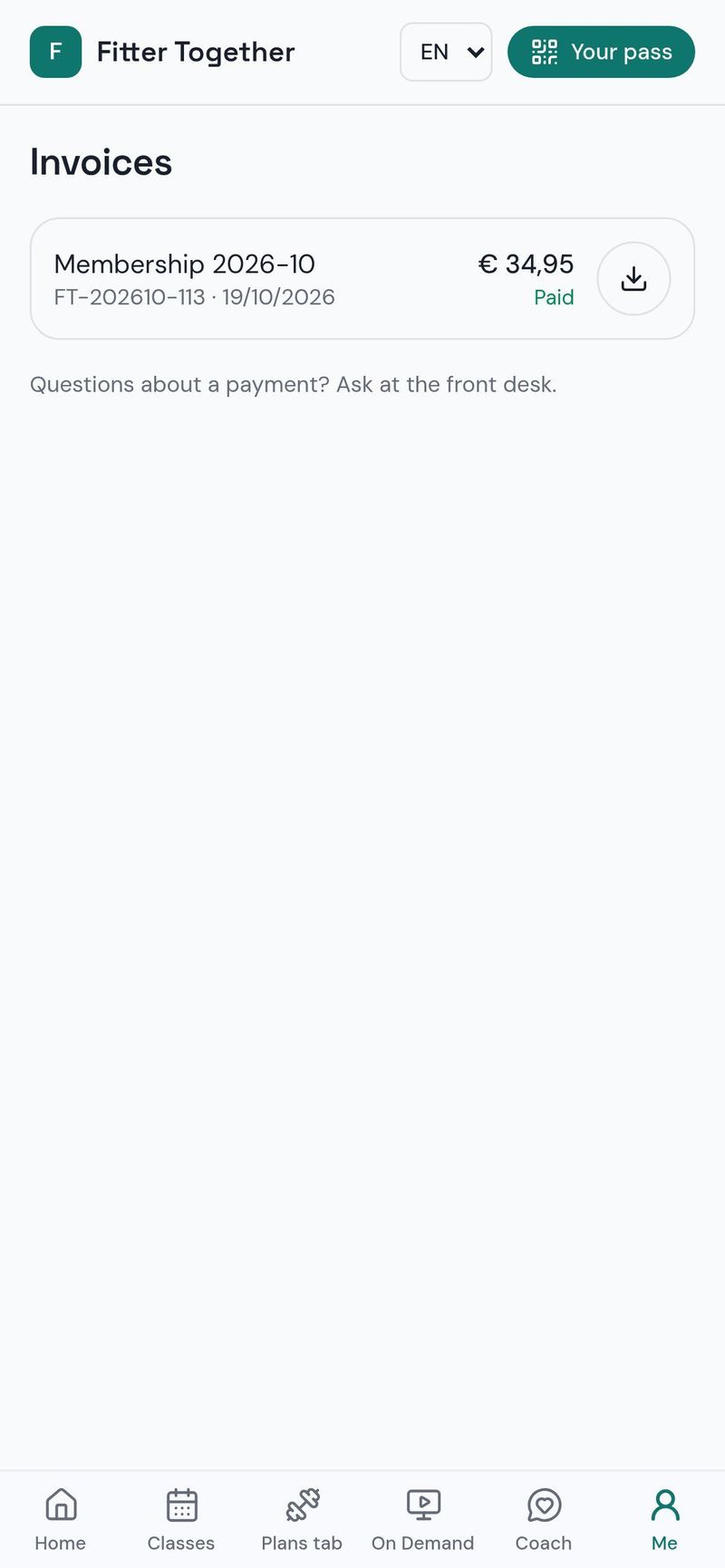
Members see their own invoices in the member app, which keeps questions about what was charged to a minimum.
The Ask Dialanta clip shows how you can ask which payments failed and get the answer straight away.
In the member app
What members see of their invoices
03 — What the AI does here
Fewer admin hours.
What the AI does
The AI answers members' questions about their membership by WhatsApp, SMS or the member app, and the right colleague gets a task when a person is needed.
What you confirm
Your team follows up failed payments and decides on freezes. Dialanta never pays, deletes or bulk-sends by itself, and medical questions go to a human. AI actions use AI credits, and Club adds 1500 on top of the 1000 in Grow.
Fees are collected automatically, failed payments do not get lost, and freezing is quick. Memberships and direct debit are Only in Club, at €599 per month per location.
The difference
Without vs with Dialanta
Without Dialanta
- Members and payments live in different places
- Failed payments are hard to find
- Admin takes hours
With Dialanta
- Members, subscriptions and invoices in one place
- Monthly fees collected automatically
- Failed payments become a task
04 — Questions
Questions answered
Only in Club
Memberships and direct debit are only in Club, €599 per month per location (Grow + €200). You get 14 days free, the first direct debit only follows after 14 days, and you can cancel monthly.
It works together with Access control, the person card, the Member app and Retention. Moving from another system? See Switch to Dialanta.
Related:
Which payment providers do you use?
Monthly fees are collected automatically through your payment provider.
What happens when a payment fails?
A failed payment lands in Tasks, so your team can follow it up.
Who can freeze a membership?
Any staff member can freeze. Member requests go to reception.
Can people sign up online?
Yes. Members sign up online, and you can send a pre-filled sign-up link.
Are memberships in Grow?
No. Memberships and direct debit are only in Club, which costs €599 per month per location.
How do class cards (strippenkaarten) work?
You create the card in Memberships with a set number of entries and a validity period, and choose whether it counts for visits, classes or both. An entry is deducted on a qualifying check-in or class booking, and your cancellation rules decide whether it is returned.
Where do I see the entries left on a card?
Remaining and used entries show on the person card.
Do class cards replace subscriptions?
No. Cards sit next to your subscriptions.
How do family memberships work?
You create a family group, link the members' records and choose the paying member. The fees of the linked members are routed to the payer, and each person keeps their own member record.
Is there a self-service portal for families?
No. Family groups are managed by your staff.
How does corporate fitness work?
You create a company group and set the employer contribution as a percentage. The member pays the individual share, and a monthly statement shows the employer's part.
Does Dialanta collect the employer's part or connect to payroll?
No. The employer's part is not collected by direct debit, there are no HR or payroll connections, and Dialanta gives no tax or fiscal advice.
Is digital signing available?
Yes, in online sign-up, as an option.
Are class cards, family and corporate memberships in Grow?
No. They are only in Club.
What is member brings member?
Members invite friends with a personal link from the Invite a friend tile in the club-branded member app and share it via WhatsApp. The new member's discount is deducted automatically at online sign-up, and once the friend is approved the inviting member's reward becomes a task for reception.
Can I reward only one of the two members?
Yes. You choose the reward for the inviting member, for the new member, or for only one of the two, and you can switch the feature on or off.
How do discount codes work?
Codes such as AUTUMN2026 give a percentage or euro discount, no joining fee or a free first month. You set a start and end date, a maximum number of uses and the memberships the code is valid for. Members enter it at online sign-up and it is checked instantly.
Can discounts stack?
No. Discounts never stack: the best one applies.
05 — Start
Run memberships without the admin.
Club €599 per month per location · 14 days free · cancel monthly