

A coach guiding a member through an exercise on the gym floor of an independent club
Dialanta

Guide

E-mail newsletters for gyms

02 Lead conversion

A newsletter keeps your club in front of leads and members between visits. This guide shows how to plan, write and send newsletters that people open, and how to keep them apart from the service e-mails your club must send.

14 days free · cancel monthly

At a glance

What it is
E-mail newsletters and automatic appointment e-mails for fitness clubs
For whom
Gym and fitness club owners and their teams
Included in
Grow and Club, with 1,500 e-mails per month
Price
From €399 per month per location, 14 days free, cancel monthly
Languages
Your club's own language — ask for a custom language; Dialanta is translated with one click.
Countries
Worldwide
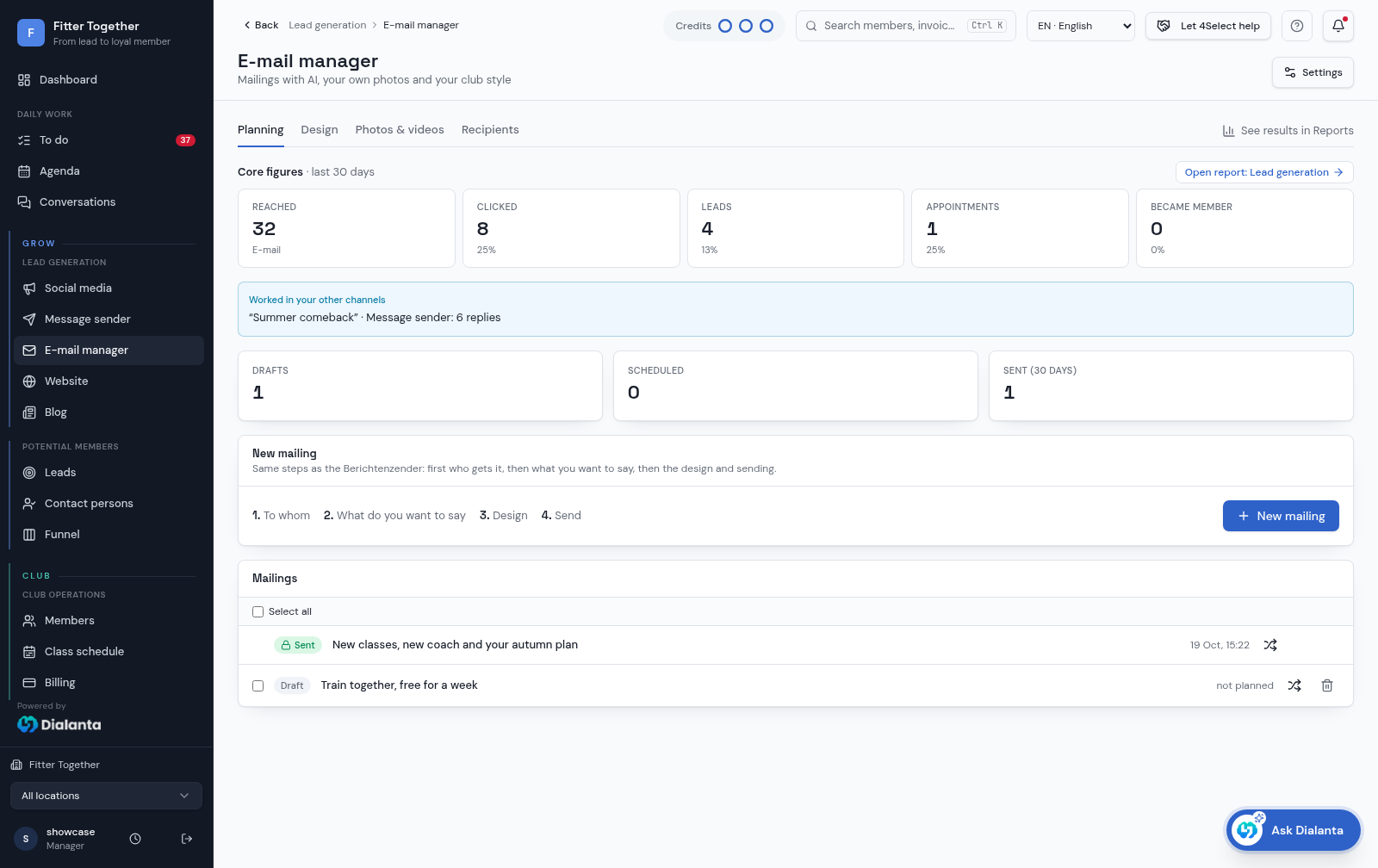
Dialanta e-mail manager with planning tab, core figures for the last 30 days and the list of mailings as draft or sent, shown with fictional demo data

Why newsletters still work for gyms

Leads who did not sign up on the first visit are not lost. They are waiting for a reason to come back. Members who are quiet are not unhappy by default. They may just need a reminder of what your club offers. A newsletter reaches both groups at a low cost and in your own voice.

A good newsletter also builds trust over time. People who read useful tips from your coaches think of your club first when they decide to train again.

In Dialanta, this is what E-mail manager is for.

Step 1: keep newsletters and service e-mails apart

A newsletter tells people something new. A service e-mail confirms or reminds, for example about an appointment. Keep the two separate. A member who unsubscribes from news should still get the messages they need, such as a confirmation or a reminder.

Always add an unsubscribe link to a newsletter. People who can leave easily trust you more, and the people who stay are the ones who want to read.

Step 2: choose one subject per newsletter

Pick one subject and say it in the first lines. It can be a new class, a tip from a coach, a question members often ask, or a story from your club. One subject is easier to write and easier to read.

Choose one next step as well, such as booking a trial or a class. If a newsletter has five buttons, readers pick none.

  • One subject per newsletter.
  • One clear next step.
  • A subject line that says what is inside.
  • A short text that a person can read on a phone.

Step 3: write in the voice of your club

Write as a coach would speak. Use short sentences and plain words. Use the names of your coaches and your own photos, because members know them. A picture of your own floor says more than a stock image.

Use blocks to give the newsletter a clear shape: a heading, a short text, a picture or a video, and a button. This also makes it easy to reuse the same layout every time.

Step 4: send to the right people

Leads and members need different messages. A lead wants to know what a trial looks like. A member wants to know what is new. Send each group something that fits where they are.

Do not send too often. A steady rhythm that your team can keep up is better than a burst of messages followed by silence.

Step 5: look at the clicks and improve

Click tracking shows which subjects and buttons people act on. Look at it after every send and ask what worked. Use that to choose your next subject. Do not guess; let the clicks guide you.

Keep a short list of subjects that worked and subjects that did not. After a few newsletters, you will see a pattern, and writing becomes faster.

Use automatic e-mails for the rest

Some e-mails should never be written by hand. An appointment confirmation, a reminder, a message after a missed appointment and a note that you tried to reach someone can all go out automatically, in your club's name. Switch each one on or off to fit how your team works.

Common mistakes to avoid

The first mistake is writing for the club instead of for the reader. Members do not care about your internal news. They care about what is in it for them: a class they can join, a tip they can use, a change that affects them.

The second mistake is long text. Most people read on a phone, in a few seconds, between other things. If the main point is not in the first lines, it is lost. The third mistake is sending to everybody the same message. A lead and a member have different questions, so treat them differently.

The last mistake is sending a newsletter and then forgetting it. Look at the results, talk about them with your team and use them in the next one.

A simple monthly rhythm

You do not need a large plan. A simple rhythm is enough: one newsletter for members with news and a tip from a coach, and one for leads with a reason to book a trial. Plan the subjects a month ahead, write them in one session and let your team read them before they go out.

If something special happens, such as a new class or a change in opening hours, send a short extra message. Keep the regular rhythm for the rest.

How Dialanta helps

The Dialanta E-mail manager builds and sends newsletters, and keeps them separate from your service e-mails. Grow includes 1,500 e-mails every month.

What the screens show

The e-mail manager shows the planning tab, core figures for the last 30 days and the list of mailings as draft or sent. Creating a mailing follows four steps: to whom it goes, what you want to say, the design and sending.

The Ask Dialanta clip shows a real answer about how the last newsletter did.

Dialanta workspace walkthrough — email · fictional demo data

Questions answered

What is the difference between a newsletter and a service e-mail?

A newsletter shares news. A service e-mail confirms or reminds, for example about an appointment. Dialanta keeps them separate.

Can AI write my newsletter?

AI helps you write the texts. You read and approve them before they go out. AI actions use AI credits.

How many e-mails are included?

Grow includes 1,500 e-mails every month.

How Dialanta helps

Dialanta is the all-in-one AI software for fitness businesses. The E-mail manager helps you with every step above.

  • Build newsletters with blocks and video, and send them to leads and contact persons.
  • AI helps you write the texts. AI actions use AI credits.
  • An unsubscribe link and click tracking are included.
  • Appointment e-mails go out automatically in your club's name.

See Dialanta
in your club.

Book a demo

From €399 per month · 14 days free · cancel monthly

All guides