
Get started · Grow and Club
Get started with Dialanta: guided setup in days
Setup takes one question per screen. After that, you get the tour called "How Dialanta works".
14 days free · first direct debit after 14 days · cancel monthly
At a glance
- What it is
- Guided setup for fitness clubs, one question per screen, followed by the tour How Dialanta works
- For whom
- Gyms, boutique studios, personal trainers and multi-location clubs
- Included in
- Grow and Club
- Price
- Grow €399, Club €599 per month per location, 14 days free, cancel monthly
- Languages
- Your club's own language — ask for a custom language; Dialanta is translated with one click.
- Countries
- Worldwide
See it in 3 minutes
See Dialanta in action
Grow and Club explained in under three minutes.

What it does
Three things this does for your club
One question per screen
Each screen asks one question, so there is nothing to read first.
The website scan starts first
Dialanta learns from your own website.
Team, number and WhatsApp
Add your team, set up your number per location, and connect WhatsApp and forms.
01 — The problem
New software should not be a project.
Many systems ask for weeks of setup before you see a result. Your team has a club to run.
Dialanta is the all-in-one AI software for fitness businesses. We guide you step by step, with one question on each screen.
You start with 14 days free. The first direct debit only follows after 14 days, and you cancel monthly.
Dialanta is the all-in-one AI software for fitness businesses, and you can start with Grow or Club.
02 — How it works
Getting started in six steps
- 1Answer one questionEach screen asks one question, so there is nothing to read first.
- 2The website scan startsThe website scan starts first, so Dialanta learns from your own website.
- 3Add your teamAdd the people who work with you.
- 4Set up your numberSet up your phone number, per location.
- 5Connect WhatsApp and formsConnect WhatsApp and set up your forms.
- 6Follow the tourThen follow the tour called "How Dialanta works".
03 — The steps
One question per screen
Website scan first
The website scan starts first.
Your team
Add your team.
Your number
Set up your phone number.
Connect WhatsApp.
Forms
Set up your forms.
The tour
Then follow the tour "How Dialanta works".
What the screens show
The screens behind this page
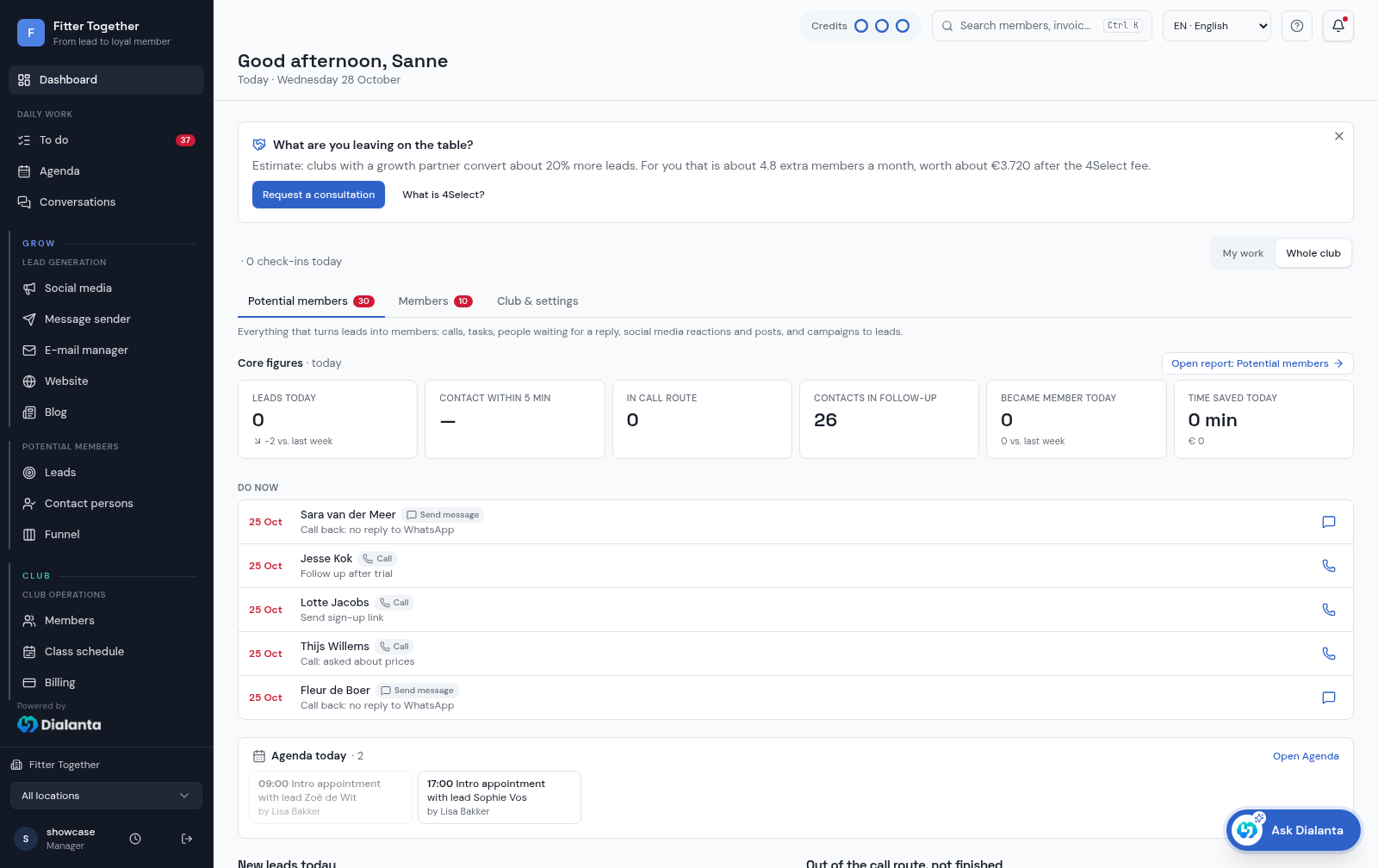
The settings screen is where you set up your account. The dashboard is where you start each day: core figures and the calls and messages to do now.
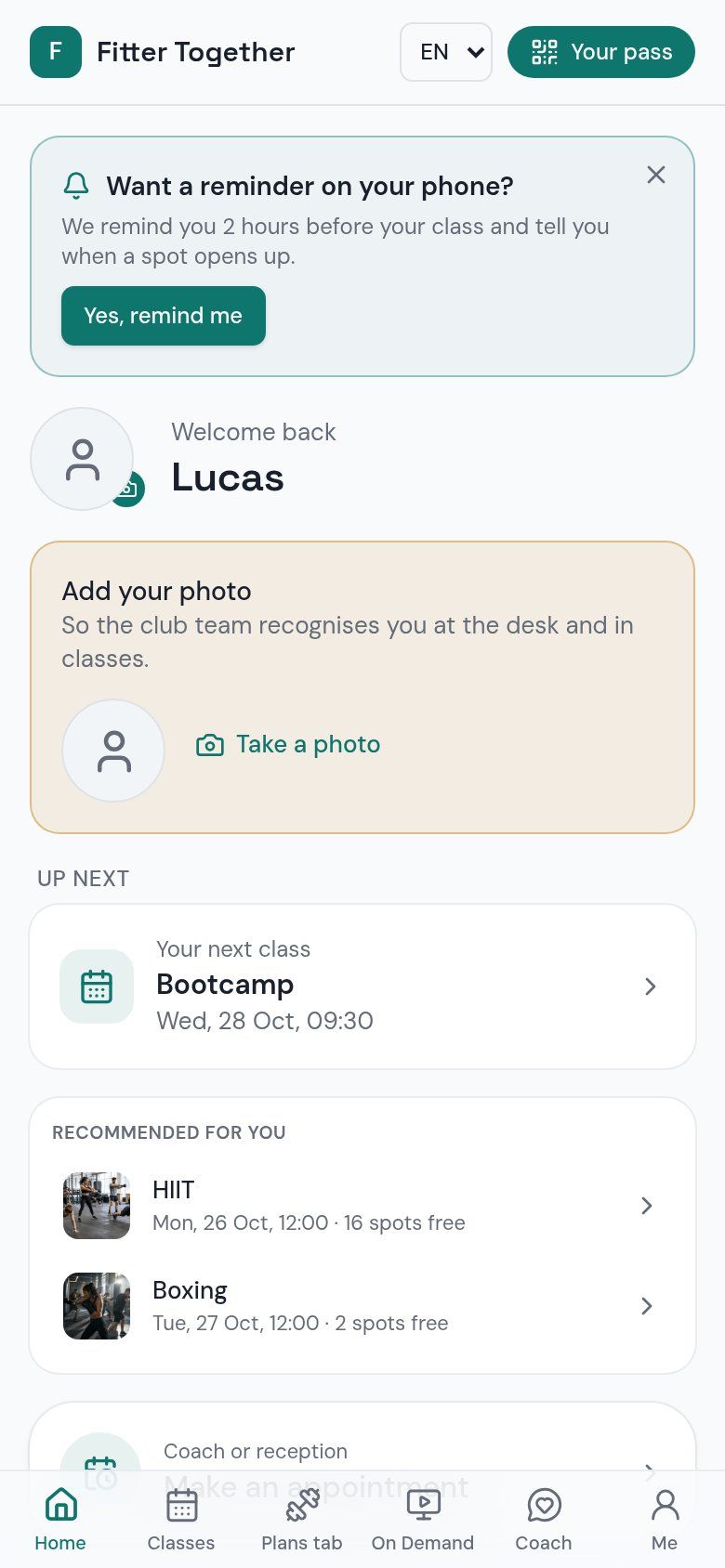
The member app home is what your members see on their phone once your club is set up in Club.
The Ask Dialanta clip shows a real answer to the question of what to do first today, a good first question once you are set up.
In the member app
What members see on their phone
03 — What the AI does here
Ready in days, not months.
What the AI does
The website scan starts first, so Dialanta learns your club from your own website before you answer the questions. AI actions use AI credits.
What you confirm
You answer the questions and confirm your team, number, WhatsApp and forms. Dialanta never pays, deletes or bulk-sends by itself.
You try Dialanta free for 14 days, and you cancel monthly. Grow costs €399 and Club €599 per month per location.
The difference
Without vs with Dialanta
Without Dialanta
- New software becomes a project
- Setup means reading manuals first
With Dialanta
- Guided setup in days
- A tour called "How Dialanta works"
- Dialanta learns from your own website
04 — Questions
Questions answered
Grow and Club
You can start with Grow (€399 per month per location) or Club (€599, which is Grow + €200). You get 14 days free, the first direct debit only follows after 14 days, and you can cancel monthly.
Every plan includes a monthly bundle of calls, WhatsApp, SMS, AI credits and e-mails. See Pricing and AI credits for details.
Related:
How does the setup work?
One question per screen, then the tour "How Dialanta works".
What happens first?
The website scan starts first. After that come the team, the number, WhatsApp and the forms.
What does it cost to start?
Nothing for the first 14 days. The first direct debit only follows after 14 days.
Do I set up each location separately?
The phone number and WhatsApp are set up per location.
Can I cancel?
Yes, monthly.
05 — Start
Start your 14 days free.
14 days free · first direct debit after 14 days · cancel monthly